Golden Hour Portrait Photography: Techniques That Actually Work
Practical portrait techniques for golden hour sessions — how to position subjects, handle backlighting, manage changing light, and get consistently good results.
Practical portrait techniques for golden hour sessions — how to position subjects, handle backlighting, manage changing light, and get consistently good results.
Why Portrait Photographers Love Golden Hour
Golden hour light is flattering on human skin for one fundamental reason: it comes from a low angle at a warm color temperature (roughly 3,000–4,000K). This combination creates soft, directional light that wraps around the face, brings out warm tones in skin, and produces catchlights in the eyes from a natural source that no artificial setup can fully replicate.
The technical explanation: low-angle light produces longer shadows that reveal facial texture and bone structure without the harshness of direct overhead sun. The warm color temperature shifts the entire scene toward reds and yellows, which flatter most skin tones because human skin contains warm undertones that cool light suppresses.
Before scheduling any portrait session, calculate the exact golden hour window for your location and date. The difference between starting 20 minutes early (during civil twilight) and 20 minutes late (missing the window) is significant.
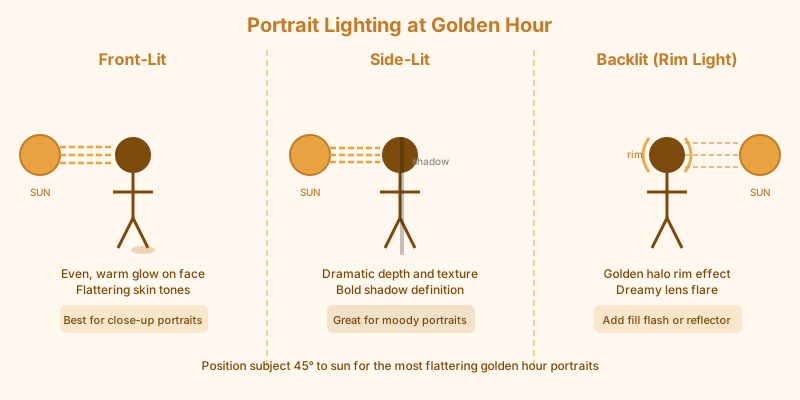
The Three Golden Hour Portrait Positions
Your relationship to the sun determines the character of the light on your subject's face. Here are the three main positions:
Front-lit (subject faces the sun). This is the simplest setup and works well when you want the subject's face fully lit with warm tones. The challenge: subjects squint. Avoid this position when the sun is fully above the horizon, as direct eye contact with the sun is uncomfortable. Use it in the last 15 minutes before the sun dips to the horizon, when it's low enough that squinting is minimal.
Side-lit. Position the subject at roughly 90° to the sun. This creates sidelight that reveals facial texture and structure. One side of the face is warm and lit; the other falls into shadow. Use a reflector or off-camera flash to fill the shadow side if the contrast is too strong.
Backlit (sun behind the subject). This is the signature golden hour portrait look. The sun rim-lights the subject's hair and shoulders, creating a warm glow around the edges. The face is in open shade, which means it's lit by the cooler, diffused skylight from in front — you often need to apply +1 stop of exposure compensation to properly expose the face while the background glows.
Managing Backlit Portraits
Backlit golden hour portraits are stunning when they work and inconsistent when they don't. Here's how to get consistent results:
Expose for the face, not the background. Meter your subject's face using spot metering or center-weighted metering. Accept that the background will be brighter, possibly blown out. A bright, warm background with a correctly exposed subject is the intended look — don't underexpose the face trying to recover sky detail.
Use exposure compensation. Apply +0.7 to +1.3 stops above what your meter suggests for backlit subjects. The meter sees the bright background and underexposes the scene; you need to compensate.
Watch for lens flare. Backlit shooting puts the sun near your frame edge or outside the frame pointing directly at your lens. Lens flare is sometimes desirable (it adds to the dreamy golden hour aesthetic), but uncontrolled flare can wash out the image and reduce contrast. Use your hand or a lens hood to shade the front element.
Find lens flare sweet spots. Slightly repositioning relative to the sun changes the flare character dramatically. Half a step left or right can turn an ugly blob of flare into a soft, hexagonal starburst. Experiment during the setup phase.
Open Shade During Golden Hour
Not all golden hour portraits need direct sunlight. Open shade — the area under a tree, beside a building, or in a doorway — gives you soft, diffused light for the face while the warm ambient from the golden sky still influences the color temperature.
This is often more controllable than full direct sun. You get flattering light on the face without squinting, without harsh shadows, and without the exposure matching challenges of backlit shooting. The challenge: the light is 2–3 stops dimmer than direct sun, so you'll need wider apertures or higher ISO.
Open shade also works well when the golden hour light itself is too harsh — in the first 10–15 minutes of the window, before the sun gets truly low, direct sunlight can still be somewhat contrasty. Moving into shade and letting the warm ambient fill the scene produces softer results.
Working Fast as the Light Changes
Golden hour light changes by 1–2 stops over the course of the window. A session that starts at f/2.8, 1/400s, ISO 200 may need to be shooting at f/2.8, 1/100s, ISO 800 by the end. Build this expectation into your workflow.
A practical approach: check your exposure every 5–10 minutes and adjust. If you're in aperture-priority mode, watch for the shutter speed dropping to a point where motion blur becomes a concern. Switch to manual and adjust incrementally rather than letting the camera make sudden exposure corrections that change the look between frames.
Shoot your most demanding compositions — anything requiring precise timing, subject movement, or complex setups — at the beginning of the session when you have more light and flexibility. Reserve the last 10–15 minutes for simpler compositions that work in dimmer light: silhouettes, close portraits, and static subjects.
Positioning Your Subject Relative to the Background
The background matters as much as the foreground during golden hour portrait sessions. A few principles:
Separate subject from background with aperture. Wide apertures (f/1.8–f/2.8) create shallow depth of field that renders the background as smooth, out-of-focus color. During golden hour, an out-of-focus warm background creates beautiful "bokeh" that enhances the dreamy quality of the light.
Use open sky as background. Positioning your subject so they're below the skyline with sky as background gives you the best use of the golden-lit sky. Even in urban environments, look for angles where the subject is framed against sky rather than buildings.
Watch for busy backgrounds. Golden hour light is warm everywhere, which means busy backgrounds are harder to control than at other times. Bright golden highlights on background elements can compete with your subject for attention. Move to minimize conflicting hot spots behind the subject.
Session Length and Scheduling
Plan for 60–90 minutes for a serious golden hour portrait session. The first 30 minutes covers setup, test shots, and getting comfortable with the light and location. The middle 30 minutes is often the prime window. The final 15–20 minutes — around and just after sunset — transitions into blue hour, which works differently but can produce beautiful results with the right subjects.
Calculate your golden hour window to set realistic expectations with clients. In summer, this may mean an 8 PM session; in winter, 4 PM. Both work — what matters is scheduling around the window rather than around conventional "photo time" assumptions.
Read about the gear that matters most for golden hour sessions to make sure you're prepared for the rapid light changes this type of work demands.