Best Camera Settings for Golden Hour Photography
Practical camera settings for golden hour shoots — aperture, shutter speed, ISO, white balance, and exposure compensation explained with real numbers.
Practical camera settings for golden hour shoots — aperture, shutter speed, ISO, white balance, and exposure compensation explained with real numbers.
The Challenge With Golden Hour Light
Golden hour is beautiful, but it changes fast. In the 40–60 minutes around sunrise or sunset, the light drops by several stops in brightness and shifts significantly in color temperature. The settings that work at the start of the window need adjustment by the end.
This is why many photographers — even experienced ones — end up with blurry, overexposed, or poorly white-balanced golden hour shots. They set the camera once and don't adapt as the light changes.
This guide gives you starting points and the reasoning behind them, so you can adjust confidently as conditions shift. Before heading out, calculate your exact golden hour window so you know how much time you're working with.
White Balance: The Most Important Setting
Most photographers set white balance to Auto (AWB) out of habit. During golden hour, this is a mistake.
Auto white balance is designed to neutralize color casts. That warm amber glow you're trying to capture? AWB will try to remove it. Your camera will shift the colors toward neutral, washing out the very quality that makes golden hour special.
Set white balance manually to 5,500–6,500K (Daylight or Cloudy preset). This preserves the warm tones rather than correcting them. If you shoot RAW (which you should during golden hour), you can adjust white balance in post — but starting with a deliberately warm setting means you're seeing the light accurately in your preview.
If you use Auto WB and shoot RAW, you can recover the warmth in Lightroom. But it's easier to see accurate colors on your LCD when shooting, which helps you evaluate exposure and composition in the moment.
Aperture: Start Wide, Know Your Limits
Golden hour light is still reasonably bright, but it drops quickly. Start with a wide aperture to keep your shutter speed manageable.
For portraits: f/1.8–f/2.8 is ideal. You get a soft background separation that complements the warm light, and you're letting in enough light to maintain a fast shutter speed even as the light fades. Watch your focus plane — at f/1.8 with a subject close to you, depth of field is thin. Use focus peaking or zoom in on your focus point to verify.
For landscapes: f/8–f/11 gives you sharpness front to back. You'll need to compensate with a slower shutter or higher ISO as the light drops, but the depth of field is worth it for wide scenes. A tripod becomes useful (and eventually necessary) when you're working at f/8 in fading light.
For architecture and cityscapes: f/8 is typically the sweet spot, especially toward the end of the window when you want buildings sharp throughout the frame.
Shutter Speed: Watch the Light Drop
At the start of the golden hour window, you might have enough light to shoot at 1/500s. By the end, 1/60s or slower isn't unusual. The change isn't linear — it accelerates as the sun drops below the horizon.
Minimum for handheld shots: 1/focal length is the traditional rule. With a 50mm lens, you need at least 1/50s. Image-stabilized lenses give you 2–4 extra stops, meaning 1/13s–1/25s may be achievable handholding a 50mm lens. That said, if your subject moves at all, you need shutter speed fast enough to freeze their motion regardless of stabilization.
Portrait rule of thumb: keep shutter speed at 1/200s or faster if your subject moves. For a still subject in flattering light, 1/100s is workable.
ISO: Raise It Without Fear
Modern cameras handle ISO 800–1600 very cleanly. Don't sacrifice shutter speed or aperture to keep ISO artificially low.
Golden hour starting settings: ISO 100–200 at the beginning of the window. As the light fades, work up through ISO 400, 800, 1600 as needed. Full-frame mirrorless and DSLR cameras produce acceptable results at ISO 3200 for standard print sizes and web output.
The grain from ISO 1600 on a modern camera looks far better than motion blur from an artificially slow shutter. Use Auto ISO with a minimum shutter speed setting if your camera supports it — most do. Set minimum shutter to 1/200s for moving subjects, ISO ceiling at 3200, and let the camera handle the ISO while you focus on composition.
Exposure Compensation: Bias Toward the Light
During golden hour, your camera's metering is trying to render the scene as middle gray. The warm, bright sky at sunset will often trick the meter into underexposing your subject.
Apply +0.3 to +1.0 stop of exposure compensation to open up shadows and preserve the warmth in the light. Check your histogram after each shot — you want data pushed toward the right without clipping the highlights. The warm tones you're preserving live in the highlights; if they clip, you lose the color.
Use your highlight clipping warning (blinkies) to monitor. It's fine to let very small areas of direct sun clip. What you don't want is the entire sky blinking overexposed.
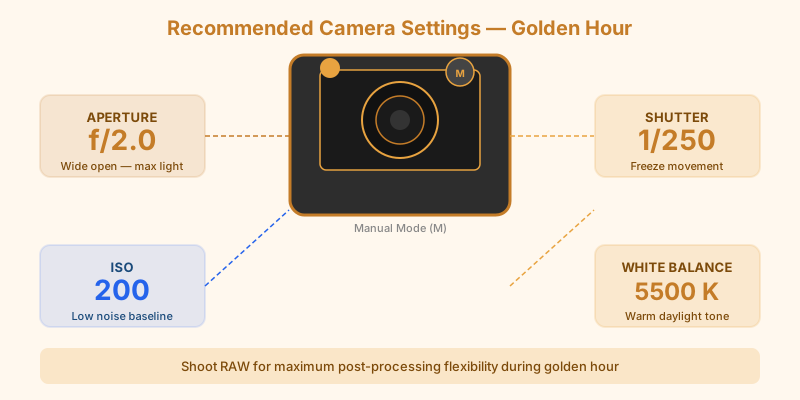
Putting It Together: A Starting Setup
Here's a practical starting point for a golden hour portrait session:
- White balance: 5,500K (Daylight)
- Aperture: f/2.0–f/2.8
- Shutter speed: 1/250s
- ISO: 200
- Exposure compensation: +0.5 stops
- Metering: evaluative/matrix
Check the exposure on your first few frames and adjust. As the light drops over the session, you'll creep ISO up and shutter speed down. Stay attentive — the light can change by a full stop in 10 minutes near the end of the window.
Shooting RAW vs JPEG
If you're ever going to shoot RAW, golden hour is the time. The color information in RAW files from a golden hour scene is genuinely difficult to replicate from a JPEG, especially if you want to selectively adjust warmth, recover blown highlights in the sky, or pull detail from shadow areas.
JPEG is fine for quick sharing and simple scenes. But if you're planning a session specifically around the light — and you used the calculator to plan the timing — shoot RAW and give yourself the flexibility in post to get every frame to its potential.
For Beginners: A Simplified Approach
If you're shooting in auto or aperture-priority mode and feel overwhelmed by all of the above, here's the single most important change: turn off Auto White Balance and set it to Daylight (5,500K).
That one adjustment — preserving the warm tones instead of neutralizing them — will make more difference to your golden hour images than any other single setting. Everything else can be dialed in as you get more comfortable with manual controls.
From there, read the complete golden hour photography guide to understand how all these variables fit together in practice.